Perform Manual Retry to Sync Service Requests
The integration with Agilysys Service is enhanced to provide a manual retry option for syncing housekeeping service requests between Stay and Agilysys Service. This enhancement allows users to manually resync service requests that were created in Stay but were not successfully generated in Service.
For example, when a date roll fails in a property in Stay, the housekeeping tasks created in Stay will not be generated in Agilysys Service for the affected business dates. Through this enhancement users can manually resync these service requests between Stay and Service.
To support this enhancement, the following changes have been made:
-
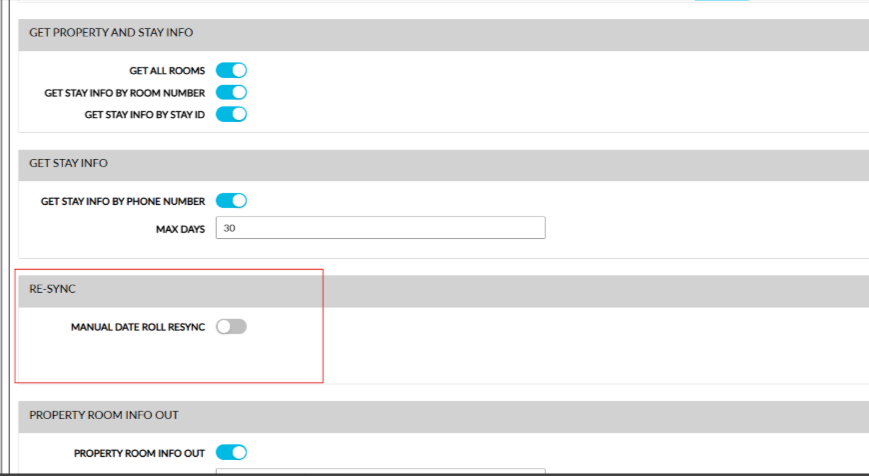
A new section, Re-Sync, has been added to the Agilysys Service interface (Interfaces ➜ Cloud Settings ➜ Settings ➜ Agilysys Service) that displays the flag, Manual Date Roll Resync. This flag supports the following functionality:
-
When enabled, users can perform a manual resync for failed date roll notifications from Stay to Service.
-
When disabled, a manual resync cannot be performed.
-
-
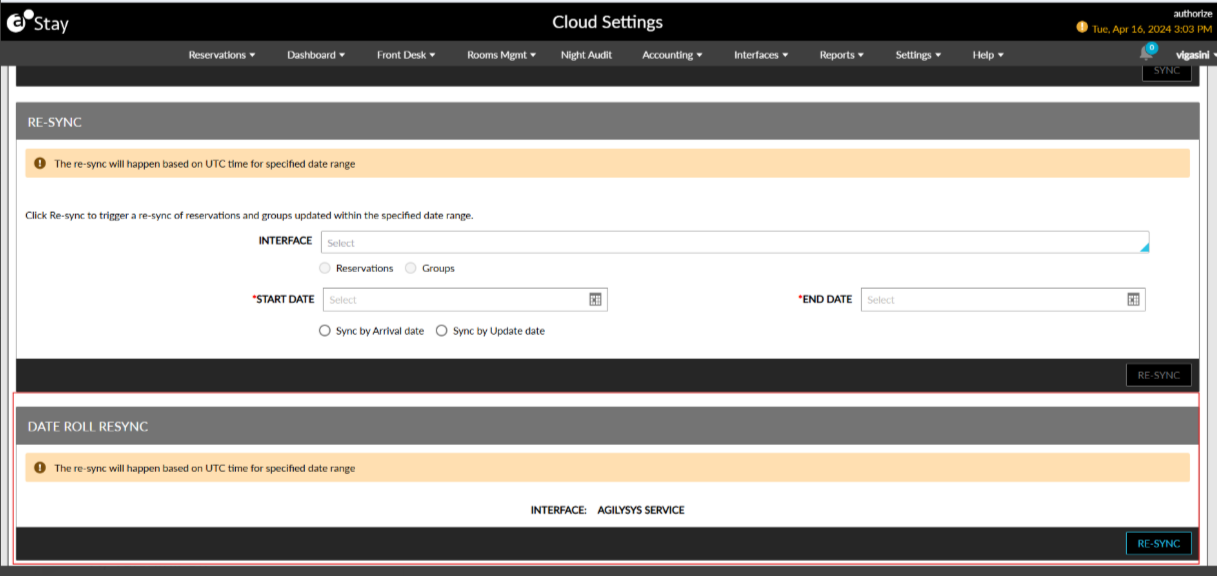
When the Manual Date Roll Resync flag is enabled, a new section, Date Roll Resync, will be displayed in the Re-Sync tab of the Cloud Settings screen. This section displays a label, Interface, that displays the interface name as Agilysys Service. Users must click the Re-Sync button in this section to perform a manual resync from Stay.